Your timer on your wrist
Apple Watch
Workout Timer
Start an EMOM or interval timer on iPhone and follow the countdown on Apple Watch, synced in real time via WatchConnectivity. Every round transition gives a haptic tap on your wrist so you know exactly when to switch. Or leave the phone behind: the Watch sets up and runs EMOM and Intervals on its own. No account, no subscription.

$2.99 once · iOS 16 or later
Watch app installs automatically with the iPhone app
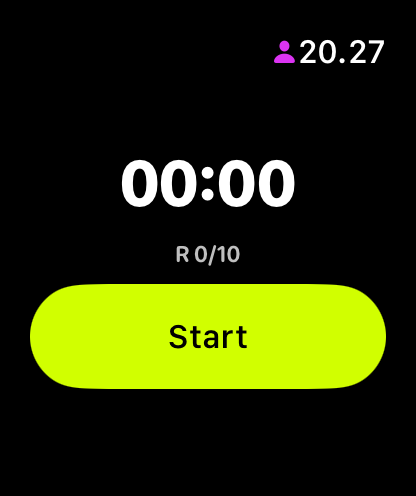
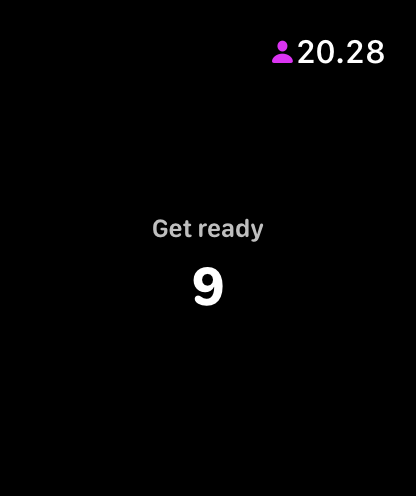
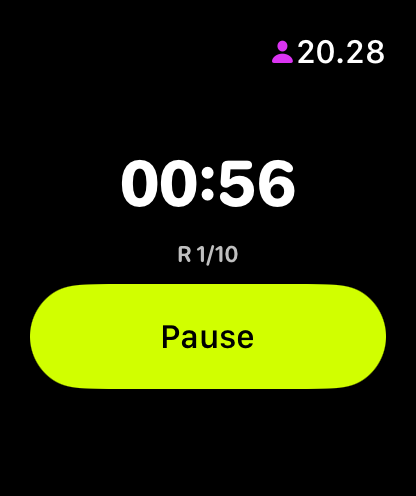
Three states. One glance.
The Watch app shows exactly what you need: the work or rest you are in, the time left in it, and the round. Nothing else. Set a workout up on the Watch and you get Start and Pause there too; follow one started on your iPhone and the Watch says so, with the controls staying on the phone.
How it works
-
iPhone → Watch
Start a workout on iPhone and the Watch picks it up instantly via WatchConnectivity. Same round, same countdown, same state. Pause on iPhone, it pauses on Watch.
-
Standalone fallback
No iPhone nearby? The Watch configures and runs EMOM and Intervals by itself, with rounds, round length, work and rest all adjustable on the wrist. For Time is started on iPhone, and the Watch follows it.
-
Haptic feedback
Feel every round transition on your wrist. Start cue, round changes, and a success tap when the workout finishes. Even in a loud gym, you always know where you are.
-
Apple Health
A finished workout on iPhone or iPad is saved to Apple Health as a HIIT session, if you allow it. The Watch doesn't write to Apple Health itself.
Built for the gym
Most timer apps on Apple Watch are afterthoughts. WODrounds was built for the Watch from day one, with the same timer engine as the iPhone app.
- Large numbers readable at a glance during a workout
- Start and Pause on the wrist for a workout you set up there
- EMOM and Intervals run on the Watch alone, so your phone can stay in the locker
- No account or login required on Watch
- Works independently without an iPhone nearby
Get WODrounds on your wrist
Download on iPhone. The Watch app installs automatically.
$2.99 once · iOS 16 or later
Requires watchOS 9 or later
Related
-
EMOM Timer →
Every Minute on the Minute. Set rounds and round length for CrossFit-style pacing.
-
Interval Timer →
Custom work and rest periods with any number of rounds. For HIIT, circuits and conditioning.
-
Beginner HIIT Workouts →
New to HIIT? 4 beginner-friendly workouts with simple settings you can start today.
-
For Time Timer →
Count up from zero and race the clock, with an optional time cap. For classic For Time WODs.
-
Timer Guide →
Learn when to use EMOM vs. intervals vs. Tabata vs. For Time and how to set up each format.